
What’s a gvl.Dataset?#
How a Dataset represents data#
In general, GenVarLoader Datasets represent a lazy collection of ragged arrays where sequences have shape (regions, samples, [ploidy], length) and tracks (e.g. read depth) have shape (regions, samples, tracks, [ploidy], length) where the length axis is always ragged (aka variable length). When the dataset is set to return personalized data, the ploidy axis is added to all output arrays.
For example, consider a personalized dataset with 4 regions and 4 samples.
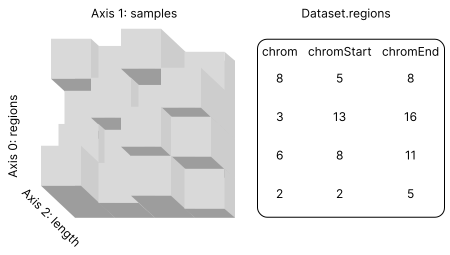
All of the sequences in this dataset have shape (regions: 4, samples: 4, ploidy: 1, length: var).
Important
Even though all regions have a length of 3, the personalized lengths can differ because of indels. Datasets can also represent variable length regions, in which case non-personalized data will also have different lengths.
Obtaining ragged, variable, or fixed length data#
The Dataset.output_length setting changes whether it returns ragged, variable, or fixed length data. For the ragged case, the data is returned exactly as it exists in the dataset. For example, suppose we define the personalized dataset from above:
ds = gvl.get_dummy_dataset()
Ragged#
By default, the Dataset.output_length is set to "ragged". So, when we index it to get two sequences we will get a gvl.Ragged object.
haps = ds[0, :3]  # shape: (batch: 3, ploidy, length: var)
len(haps[0, 0])  # 3
len(haps[1, 0])  # 2
len(haps[2, 0])  # 4
Variable#
We can change the Dataset.output_length to "variable" and each batch of data will be a NumPy array.
ds = ds.with_len("variable")
haps = ds[0, :3]
haps.shape  # (3, ploidy, 4)
With variable length output, a batch of ragged data is converted to be rectilinear by right-padding each item to have the same length as the longest item in the batch.
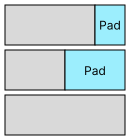
The pad value depends on the data type, for sequences it is b'N' and for tracks it is 0. As a result, the length of any given batch will change depending on the longest item in the batch, hence the name, "variable", for this setting.
Fixed#
Finally, we can also obtain fixed length NumPy arrays from a Dataset by provided an integer:
ds = ds.with_len(2)
haps = ds[0, :3]
haps.shape  # (3, ploidy, 2)
In this case, the personalized length may be either shorter or longer than the output length so the Dataset can do a combination of padding, random shifting, and truncating to achieve the desired length. For example, suppose we have a personalized length \(L = 10\) and an output length \(L_{\text{out}} = 5\).
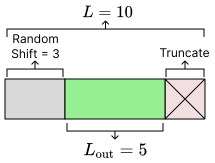
Datasets can either deterministically truncate the extra length or apply a random shift \(s \sim U(0, L - L_{\text{out}})\) before truncating the rest.
Note
Datasets are deterministic by default (\(s = 0\)) but can be enabled via settings:
ds = ds.with_settings(deterministic=False)
Alternatively, we could have a personalized length \(L = 3\) and an output length \(L_{\text{out}} = 5\).
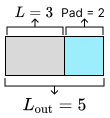
In this case, the personalized data is padded with more personalized data to the desired length.
Important
Datasets have a maximum fixed output length! The BED file given to gvl.write() specifies what data should exist in the Dataset – data outside of those regions cannot be generated by the Dataset! This means the output length must be no more than the smallest region in the Dataset. i.e. \(L_{\text{out}} \le \min(|\text{regions}|)\). However, Datasets support jitter so the data in the Dataset actually correspond to regions that have been expanded by max_jitter on either side. Thus, the full constraint on output length is:
where \(j\) is the current jitter and \(j_{\text{max}}\) is the maximum jitter allowed by the Dataset. If you try to use a value greater than this the Dataset will raise an error.
Track re-alignment (realign_tracks)#
When a Dataset returns both haplotypes and tracks, indels cause the haplotype length to differ from the reference length. By default, track values are re-aligned to haplotype coordinates so that each base in the haplotype corresponds to the correct track value. This is controlled by with_settings(realign_tracks=...).
|
Behavior |
|---|---|
|
Track values are re-aligned to haplotype coordinates (indel-aware). Required when |
|
Track values are returned in reference coordinates (as-is, no indel re-alignment). |
Set realign_tracks=False in two cases:
kind="intervals"with a variant-aware seq mode ("haplotypes","annotated","variants","variant-windows"): interval tracks cannot be re-aligned, sorealign_tracks=Falseis required. Combiningkind="intervals"with a variant-aware seq mode without settingrealign_tracks=Falseraises aValueError."variant-windows"+ tracks: tracks must be reference-coordinate when used alongside the variant-windows output.
ds = gvl.get_dummy_dataset()

# Reference-coordinate float tracks alongside haplotypes
ds_ref_tracks = ds.with_seqs("haplotypes").with_tracks(["read-depth"]).with_settings(realign_tracks=False)

# Interval tracks alongside haplotypes (realign_tracks=False is required)
ds_itvs = (
    ds.with_seqs("haplotypes")
    .with_tracks(["read-depth"], kind="intervals")
    .with_settings(realign_tracks=False)
)
In "flat" output mode (with_output_format("flat")), float tracks return FlatRagged and interval tracks (kind="intervals") return FlatIntervals, which carries .starts, .ends, .values as FlatRagged fields and converts back via .to_ragged() → RaggedIntervals.
Variant fields (var_fields)#
Dataset.open(..., var_fields=[...]) (and Dataset.with_settings(var_fields=[...])) selects which
per-variant fields load onto "variants" and "variant-windows" output, beyond the default
["alt", "ilen", "start"]. Requested names must be a subset of Dataset.available_var_fields.
For a BCF/PGEN/.svar-backed dataset the available fields are the built-ins (alt, start,
ref, ilen, dosage) plus any per-variant INFO columns or per-call FORMAT fields the source
carries.
For a .svar2-backed dataset, available_var_fields is narrower:
["alt", "ilen", "start"] plus whichever scalar-numeric INFO/FORMAT fields the .svar2 store was
written with (via genoray.SparseVar2.from_vcf(info_fields=[...], format_fields=[...])) —
"ref" and "dosage" are not valid var_fields for .svar2 and requesting either raises.
A requested store field shows up on both output kinds:
ds = gvl.Dataset.open("ds.gvl", reference="ref.fa", var_fields=["AF"])

rv = ds.with_seqs("variants")[0, 0]
rv["AF"]  # per-variant AF values, aligned with rv.alt/.start/.ilen

win = ds.with_seqs("variant-windows", gvl.VarWindowOpt(...)).with_output_format("flat")[0, 0]
win.fields["AF"]  # same field, alongside win.fields["start"]/["ilen"]
Allele fields index per variant, aligned with the scalar fields on the same shared offsets:
rv = ds.with_seqs("variants")[0, 0]

for pos, alt in zip(rv.start[0][0], rv.alt[0][0]):
    print(pos, alt)  # 10 b'A'  /  20 b'GG'
This requires seqpro >= 0.22. On earlier versions rv.alt[0][0] returned the
haplotype’s alleles concatenated into one bytes, which misaligns against
rv.start as soon as a window contains an indel.
See the genvarloader skill’s .svar2 var_fields section for the field-provenance and
dummy-fill details.